
5. Where Do I Find DHCS Templates
Where do I find DHCS templates?
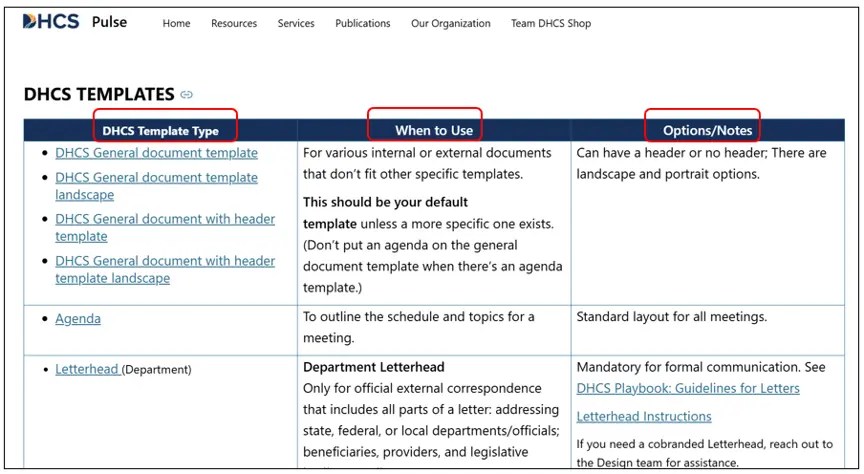
The templates can be found on Pulse (intranet) on the Visual Identity Resources page. Scroll down to find the templates section, you will see all the templates listed there along with when to use descriptions, options/notes, and download links.
When choosing a template, make sure you read the “when to use” description, so you get the one that fits your needs best. If you don’t see a specific template for your document type, choose the “DHCS General document template”.
- Go to the Visual Identity Resources Page on Pulse
- Scroll down to the Templates section
- Select the specific template to download
You can also access the templates directly within Microsoft Word, without having to visit Pulse (follow these same steps in PowerPoint to find the templates in PowerPoint format as well):
- Open Microsoft Word
- Go up to File
- Navigate down to New
- Select the Shared tab
- Choose one of the DHCS-approved templates
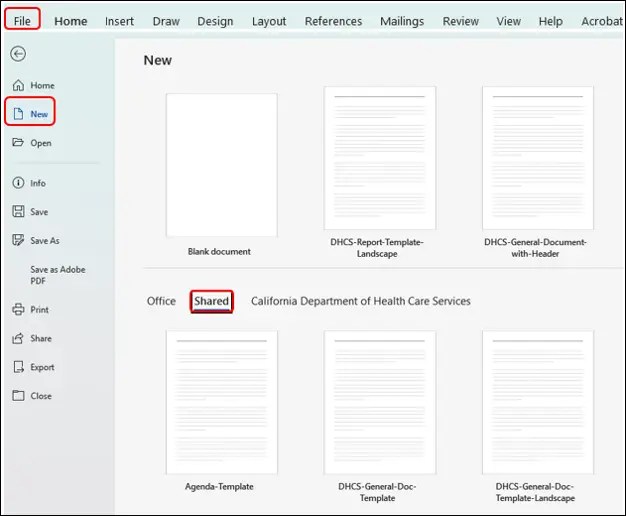
There are many templates to choose from, so be certain you are using the most specific template for your document type and only use the general document template if no other template fits the description for your content type.
If you find that none of the available templates meet the requirements of your project, reach out to the web team and we’ll work with you to explore whether a tailored template can be developed.
Just remember not to save these templates to your workstation, as they are updated regularly. To ensure you are always using the current version, you must download a new template from the source each time.